Apni Chhat Mehfooz Chhat Scheme – Apply Online [Complete Guide]
 Follow us on Facebook
 Join our WhatsApp Channel
 Subscribe on YouTube
![Apni Chhat Mehfooz Chhat Scheme - Apply Online [Complete Guide]](https://allprograms.com.pk/wp-content/uploads/2026/07/Apni-Chhat-Mehfooz-Chhat-Scheme-Apply-Online-Complete-Guide-1.png)
It was a normal Tuesday morning. June 30, 2026. In a small tuition centre in Kahna, Lahore, a group of children had just sat down for their lesson. Some were only 4 years old. Their bags were still on their backs. Their mothers had just walked back home after dropping them off.
And then, the roof came down.
14 children died that day. Not because of a flood. Not because of an earthquake. But because of a roof that nobody had checked, nobody had repaired, and nobody thought would ever fall — until it did.
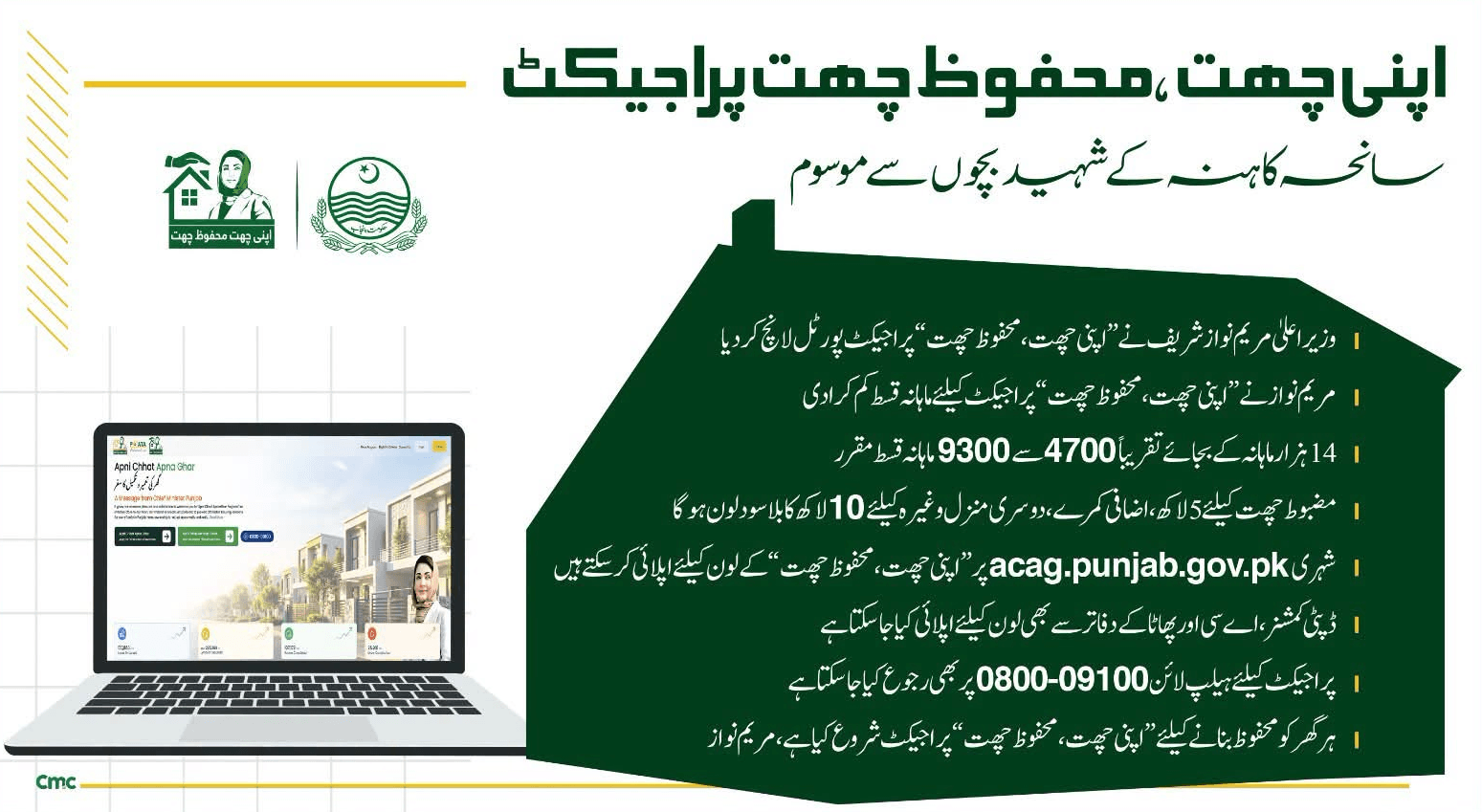
That single morning changed something in Punjab. Chief Minister Maryam Nawaz Sharif did not just issue a statement of grief and move on to the next news cycle. Within days, her government launched a brand-new relief and prevention programme called Apni Chhat, Mehfooz Chhat.
In this one guide, I am going to explain absolutely everything about this scheme — what it is, why it started, who can apply, exactly how to fill the online form step by step, what documents you need, how much money you can get, how long it takes, and every small detail that people usually get confused about. You will not need to read any other article after this one. Just take your time, read it slowly, and if your roof or your walls are weak — this article could genuinely change your family’s situation.
In short (agar aap ko jaldi hai): The Punjab Government is giving interest-free loans — up to Rs 500,000 to repair a weak roof or wall, or up to Rs 1,000,000 to build a full new floor on your existing house. You apply for free, fully online, at acag.punjab.gov.pk. No agent, no fee, no bribe needed.
The Kahna Tragedy — Why Apni Chhat, Mehfooz Chhat Even Exists
Before we talk about loans and forms, it’s important you understand where this scheme actually came from — because it wasn’t planned in some office months in advance. It was born out of a real tragedy that shook the entire country.
Kahna is a small, crowded suburb on the edge of Lahore, filled with modest homes and small private academies where local children go for extra tuition after school. On June 30, 2026, one such tuition centre was operating like it did every single day. Children were sitting on the floor, notebooks open, teacher explaining the lesson — and then the roof gave way completely.
There was no earthquake. No storm. No obvious warning sign that morning. The building had simply been weak for a long time, and nobody had the money, the awareness, or maybe the courage to fix it before it was too late. Fourteen children between the ages of four and twelve lost their lives, and several others were seriously injured. Two people connected to the building were taken into police custody as investigations began.
This tragedy is not unique to Kahna. If you walk through almost any lower-income neighbourhood in Punjab — in cities and in villages both — you will find homes with cracked ceilings, bulging walls, roofs held together with makeshift patches, and families who know their house is not fully safe but simply have no way to pay for repairs. Kahna was the moment this silent, everyday danger finally became impossible to ignore.
CM Maryam Nawaz personally announced this new phase of the housing programme and dedicated it to the children who died. In her own words:
“ہم نے ‘اپنی چھت، اپنا گھر’ پروگرام کے تحت ایک نئی اسکیم لانچ کی ہے۔ پنجاب بھر کے شہری اپنے گھر کی دیواروں اور چھتوں کو مضبوط بنانے کے لیے 10 لاکھ روپے تک کا بلا سود قرض حاصل کر سکتے ہیں۔”
— CM Maryam Nawaz Sharif, Official Announcement
So when you apply for this loan, understand what it really is — it’s Punjab’s answer to a tragedy, and its whole purpose is to stop the next Kahna from ever happening. If your roof has cracks, if your walls feel weak when it rains, don’t wait for something bad to happen. Apni Chhat, Mehfooz Chhat Scheme is built exactly for your situation.
What Is the Apni Chhat, Mehfooz Chhat Scheme?

Apni Chhat, Mehfooz Chhat is a government housing-repair programme launched by the Government of Punjab, run as an extension of the already-existing Apna Ghar Apni Chhat (ACAG) programme. It is managed and processed through the Punjab Housing and Town Planning Authority (PHATA), and the entire process — from application to tracking your status — happens on one official website.
Here is the simplest way to understand it: if you own a small plot or a home in Punjab, and your roof is weak, your walls are cracked, or you simply need one more room or floor but don’t have the savings for it — the Punjab Government will lend you the money to do it. And unlike a normal bank loan, you pay back zero interest. You only return the exact amount you borrowed, spread out over easy monthly instalments across a few years.
Let’s be very clear about one thing, because a lot of people get confused here: this is a loan, not free money. You will have to pay it back. But because it is completely interest-free, and because you get up to three months of grace period before your first instalment is due, it is one of the most affordable ways any ordinary Punjabi family can fix a genuinely dangerous home right now.
2 Loan Categories of Apni Chhat, Mehfooz Chhat Program
When you open the official portal, you will be asked to choose between two categories right at the very first step. This decision is important, because once you select a category and submit your form, you cannot change it later. So read this section carefully before you go anywhere near the application form.
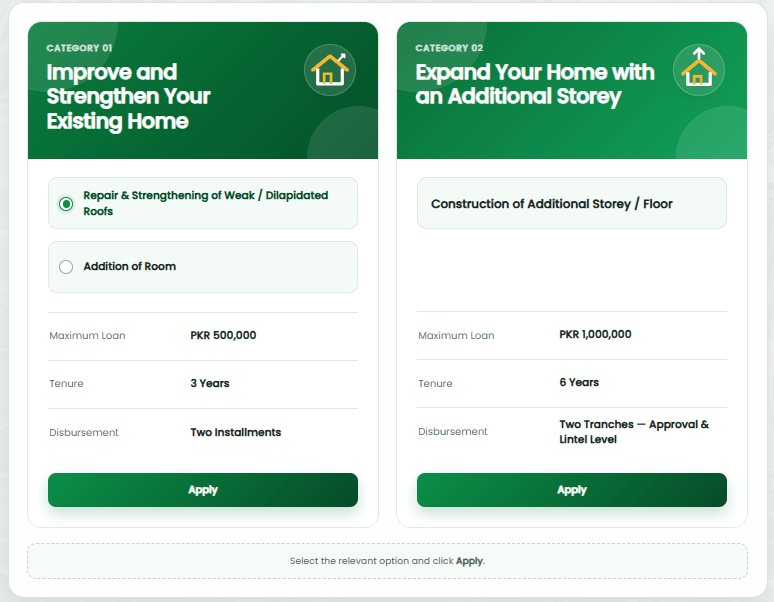
Category 1 — Repair and Strengthen Your Existing Home
This category is for you if your existing house already has a roof and walls, but they are weak, cracked, leaking, or dangerous, and you just need to repair or reinforce what’s already there. It is also the category to choose if you simply want to add one extra room to your existing home.
- Maximum loan amount: Rs 500,000 (five lakh rupees)
- Repayment period: 3 years, in easy monthly instalments
- Money is given to you in: two separate instalments, not all at once
- What it can be used for: repairing a weak or damaged roof, strengthening cracked or weak walls, or constructing one additional room
Category 2 — Build a Complete Additional Floor
This category is for families who want to construct an entirely new storey on top of their existing house — for example, if your family has grown and you need more living space, or if you want to build separate portions for your children as they get married and start their own households.
- Maximum loan amount: Rs 1,000,000 (ten lakh rupees)
- Repayment period: 6 years, in easy monthly instalments
- Money is given to you in: two tranches — the first when your loan is approved, and the second once your construction reaches “lintel level” (the level where the roof slab is about to be poured)
- What it can be used for: full construction of one additional floor/storey on your existing house
One very important tip most people don’t know: you are not forced to borrow the full maximum amount. If your roof repair will realistically only cost around Rs 250,000, you should enter 250,000 in the “Required Loan Amount” field, not the full five lakh. Borrowing only what you actually need means smaller monthly instalments and an easier repayment for your family later.
Apni Chhat, Mehfooz Chhat Program Quick Overview:
Eligibilty Criteria for Apni Chat Mahfooz Ghar
Before you spend time filling the form, go through every single point below. Even one unmet condition can get your application rejected, so read this part slowly.
1. You must be a permanent resident of Punjab. This is decided by the address written on your CNIC, not by where you currently live or work. If your CNIC shows an address from Sindh, KPK, Balochistan, or anywhere outside Punjab, you unfortunately cannot apply under this scheme — even if you have been living in Punjab for years.
2. Your plot size must be within the limit. If your home is in a city or urban area, your plot must be 5 Marla or smaller. If your home is in a village or rural area, your plot must be 10 Marla or smaller. On top of that, you must be the sole legal owner — the plot cannot be jointly owned with someone else, and it cannot be under any legal dispute.
3. Your age must be between 21 and 60 years on the date you submit your application. If you are 20 years old today, wait until your next birthday. If you are already past 60, unfortunately you do not qualify — but another family member who owns the property and falls within this age range could apply instead, if eligible.
4. You must have a clean record. If you have ever been convicted (not just accused, but actually convicted) of an anti-state, anti-social, or serious criminal offence, you will not be approved.
5. You must not currently be a loan defaulter. This means you should not have any unpaid, overdue loan sitting against your name at any bank or financial institution in Pakistan. The system checks this automatically through financial databases, so there is no point trying to hide it.
6. You must agree to data verification. During the application, you will be asked to give consent for the government to check your details against NADRA records, land ownership records, and banking records. This is a standard step and you cannot proceed without agreeing to it.
⚠️ One mistake ruins everything: If your CNIC has expired, please renew it at NADRA before you even open the application form. Every single part of this system — your identity, your age, your address — is verified through your CNIC. An expired CNIC will cause your form to fail or your application to get rejected later during verification.
Documents You Must Prepare Before You Start
Applying is much faster if you gather everything below before you open your browser. Take clear photos or scans — blurry, dark, or half-cut images are one of the biggest reasons applications get delayed.
- Your CNIC — both the front side and the back side, as two separate, clear images
- Proof of land ownership — this can be a Registry, a Fard (record of rights), an Allotment Letter, an Ownership Document, or an Affidavit of Non-Encumbrance/Qabza issued by your local Tehsildar
- A recent photograph of yourself — a simple, clear passport-style photo is enough
- A photo of your damaged roof or weak walls — this is especially important if you are applying under Category 1, as it acts as visible proof of your need
- An active Pakistani mobile number that belongs to you — the system sends a One-Time Password (OTP) to this number, so it must be a number you can personally access
Every document must be uploaded as a JPG, PNG, or PDF file, and each individual file must be under 1MB in size. If your photo file is too large, you can compress it for free using any online image compressor before uploading — just search “compress image online” and use any trusted free tool.
How to Apply Online for Apni Chhat, Mehfooz Chhat Scheme?
This is the part most people struggle with, so I am going to walk you through it exactly like I am sitting next to you, screen by screen. There is no need to visit any government office to submit your application — the entire thing happens online, from your own mobile phone or computer.
Step 1: Open the Official Portal and Choose Your Loan Category
Open your mobile or computer browser (Chrome works best) and go to acag.punjab.gov.pk/Layouts/LoanCategory.aspx.
- You will see 2 clear boxes on the screen — one labelled Category 01 for home repair (up to Rs 500,000), and one labelled Category 02 for building a new floor (up to Rs 1,000,000). Read both again if you’re unsure, then tap the Apply button under the one that matches your real need.
Remember: this choice is final once you move forward, so don’t rush this part.
Step 2: Create Your Account Using the Citizen Registration Form
A registration form will open in front of you when you click on apply according to your choice category. Fill in every field exactly and honestly:
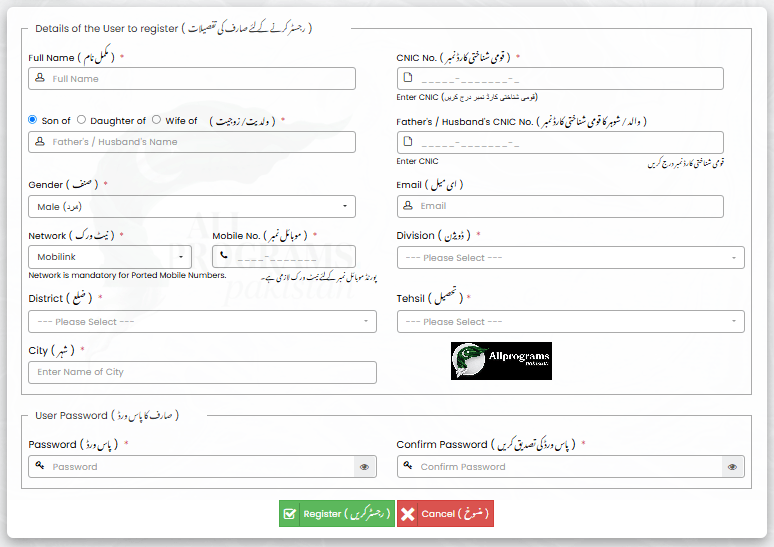
— Full Name: type it exactly the way it appears on your CNIC, no nicknames or shortcuts
— CNIC Number: your 13-digit national identity card number, without dashes if the field doesn’t ask for them
— Father’s or Husband’s Name and CNIC: choose “Son of,” “Daughter of,” or “Wife of” depending on your situation, then enter the name and CNIC correctly
— Gender: select Male, Female, or Other as applicable
— Email Address: this field is optional, but I strongly recommend filling it in, because it becomes very useful later if you ever forget your password
— Mobile Network: select your SIM’s network from the list — Mobilink/Jazz, Telenor, Ufone, Warid, or Zong. If your SIM number was ported from one network to another, make sure to select the correct current network, because this field becomes compulsory in that case
— Mobile Number: enter your active number carefully, because your OTP (verification code) will be sent here
— Division, District, Tehsil, and City: select your current area step by step from the dropdown menus
— Password: create a strong password and type it again to confirm. Please, please write this password down somewhere safe — on paper, in your phone’s notes app, anywhere you won’t lose it. So many people lose access to their own application simply because they forgot this password.
Once every field is correctly filled, click the Register button at the bottom of the page.
Step 3: Log In to Your New Account
After registering, you’ll be taken to (or need to go back to) the login page. Enter your CNIC number and the password you just created, solve the small captcha puzzle that appears on the screen (this is just to prove you’re a real human and not a bot), and click Login.
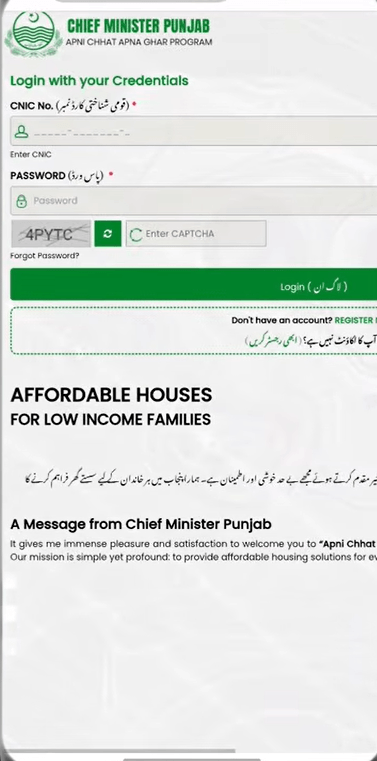
Getting a “CNIC Already Exists” Issue? Don’t panic — this simply means you (or someone using your CNIC by mistake) already registered on this ACAG Portal before, maybe during an earlier ACAG ballot. Just click Forgot Password on the login screen, enter your CNIC number, click Get OTP, check your registered mobile or email for the code, enter it, set a brand-new password, and log in normally. It only takes two extra minutes.
Step 4: Read and Accept the Certificate/Declaration Page
After logging in, a Certificate page will appear with four checkboxes. Read every line carefully before ticking, because this is technically a legal declaration:
☑ I am a permanent resident of Punjab, Pakistan
☑ I do not have any criminal record
☑ I am the lawful owner of the plot for which I am applying
☑ Disclaimer — I confirm all information I am providing is true and accurate, and I understand that if I give false information, my application can be rejected and legal action can be taken against me
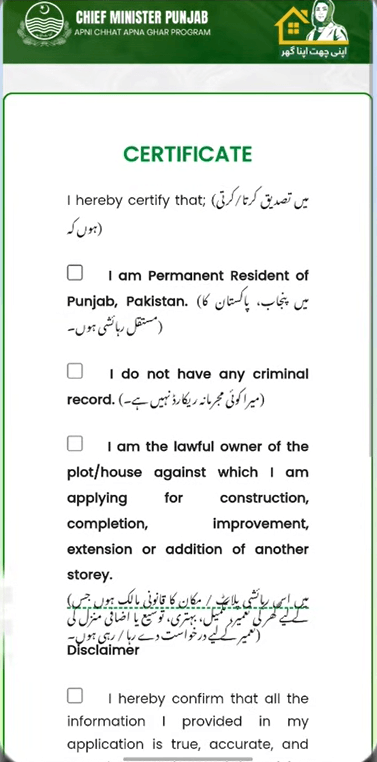
Tick all four boxes only if they are genuinely true for your situation, then click Proceed.
Step 5: Fill In Your Property (Plot) Information
Your personal details will already be filled in automatically from your registration. Scroll down to the section called Property Information. This section is about your plot, not about you personally, so fill it carefully:
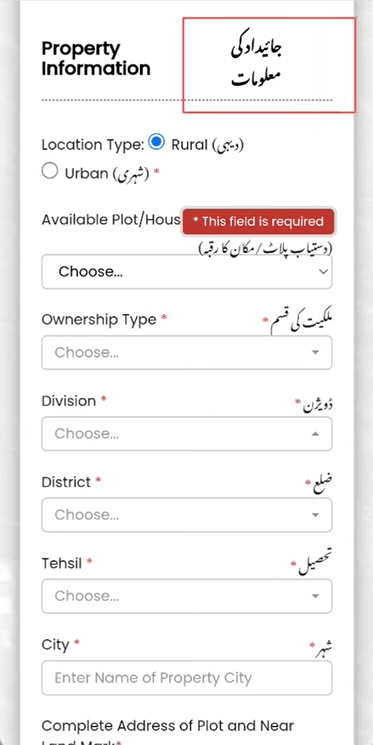
— Area Type: choose either “Rural” or “City/Urban” depending on where your plot is located
— Plot Size: select the correct size from the dropdown — remember, Rural must be 10 Marla or under, and Urban must be 5 Marla or under
— Ownership Type: select whichever document you actually possess — Registry, Fard, Allotment Letter, Affidavit of Non-Encumbrance, or Qabza from Tehsildar
— Plot Division, District, Tehsil, and City: this is the location of your plot specifically (it may be different from your personal address entered earlier)
— Complete Address of the Plot: write the full address including a well-known nearby landmark, so that the field verification team can locate your home easily
Step 6: Enter Your Required Loan Amount and Choose Your MFI
Your category (and therefore your maximum limit — 5 lakh or 10 lakh) is already locked from Step 1. But in the Required Loan Amount field, you should enter the exact amount you genuinely need — you are not obligated to request the full maximum. For example, if fixing your roof will realistically cost around Rs 300,000, simply type 300000.
You will also be asked to select a Microfinance Institution (MFI) from a list — this is the bank or financial organisation through which your loan money will actually be sent to you, and through which you will make your monthly repayments later.
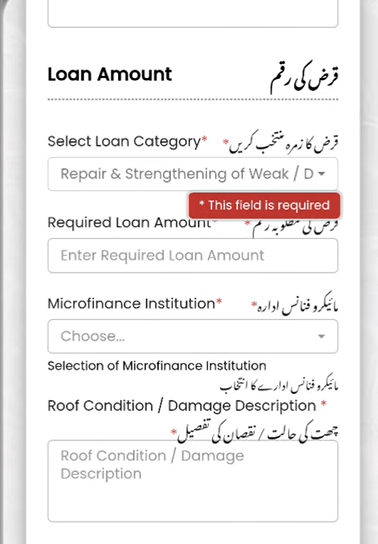
There is also a description box where you must explain the condition of your home in your own words. Don’t just write one line — describe it properly. Mention where the cracks are, whether water leaks in during rain, whether the roof has already started sagging, how long the problem has existed, and why it worries you. A clear, honest, detailed description genuinely helps your case move faster during review.
Step 7: Complete Your Household and Income Information
— Occupation: choose Employed, Self-Employed, Business Owner, Housewife, or Unemployed (selecting Unemployed will hide some fields that don’t apply to you)
— Place of Employment (City): the city where you actually work
— Sector: government or private, whichever applies
— Monthly Income: your personal monthly income in rupees
— Household Income Type: how your overall household earns its living
— Accommodation Status: whether you currently own or rent the home you live in
— Applicant Photo: upload the clear, recent photo of yourself that you prepared earlier
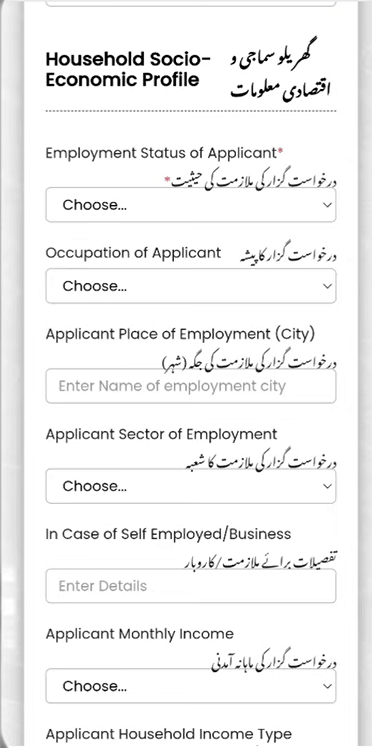
Once done, click Save & Next.
Step 8: Upload All Your Documents
📎 CNIC Front side
📎 CNIC Back side
📎 Ownership Document (Registry, Fard, Allotment Letter, or Affidavit)
📎 A clear photo of your damaged roof or weak walls
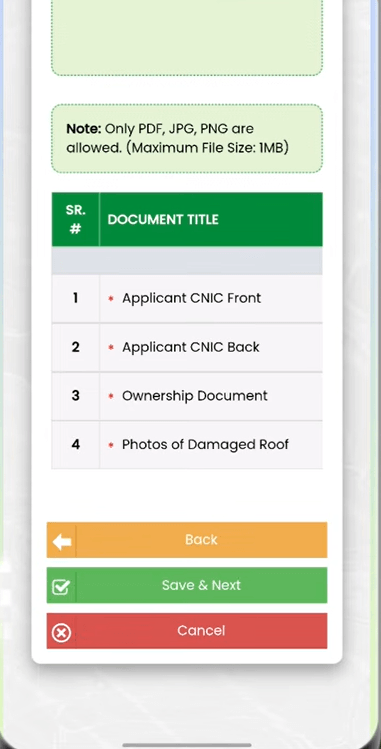
Each file must be JPG, PNG, or PDF format, and no larger than 1MB. Once all 4 are uploaded successfully, click Save & Next.
Step 9: Add Your Personal Feedback (Optional but Recommended)
There is a small text box here where you can write a short, honest note about your situation and your hopes for this programme. This step is optional, but I would recommend writing at least 2 or 3 genuine sentences — it puts a human face on your application. Then click Save & Next.
Step 10: Review Everything and Submit
Before the final submission, scroll back through everything you entered and double-check it — your CNIC number, your mobile number, your plot size, and your uploaded documents. Small typing mistakes here can cause delays later. Once you’re confident everything is correct, click the Submit button.
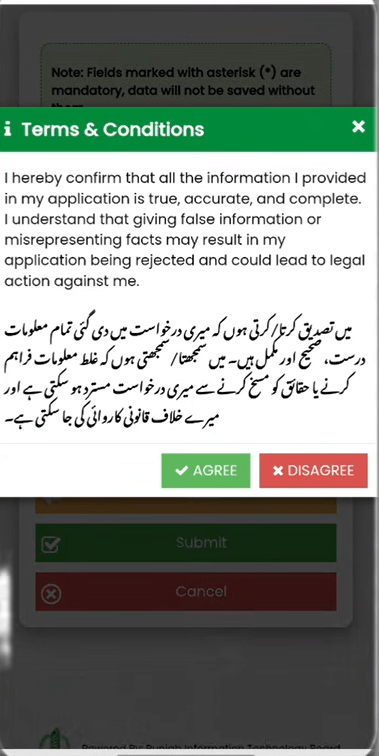
A pop-up message will appear asking, “Do you want to submit your application for the scrutinizing process?” Click OK. A terms and conditions screen will then appear — read it and click AGREE.
Congratulations — your application has now been successfully submitted.
A confirmation screen will show your Application ID, your name, your CNIC number, and your current application status. Please take a screenshot of this screen right now, and also write your Application ID down somewhere safe. You will need this ID every single time you want to check your application’s progress.
What Happens After You Submit Your Application?
Many people assume that once they click “Submit,” the money arrives the next day. In reality, your application goes through a proper multi-stage government review process. Understanding these stages will help you stay patient and know what to expect at each point.
Stage 1 — Initial Document Review: Government staff first check whether your form is complete and whether your basic eligibility criteria (age, residency, plot size) are met.
Stage 2 — Background and Database Verification: Your CNIC is cross-checked against NADRA’s records, your ownership claim is checked against official land records, and your financial history is checked to confirm you are not currently a loan defaulter anywhere.
Stage 3 — Physical Site Verification: In most cases, a government representative will actually visit your home in person to see the real condition of your roof or walls with their own eyes. This is exactly why honesty in your earlier description matters so much — if what they see doesn’t match what you wrote, it can create serious problems for your application.
Stage 4 — Final Approval and Disbursement: If everything checks out at every stage, your loan gets approved, and the money is sent to you through your selected Microfinance Institution in the instalments explained earlier in this guide.
You can check exactly which stage your application is currently at, at any time, by logging back in to acag.punjab.gov.pk using your CNIC and password, and entering your Application ID.
Common Mistakes That Get Applications Rejected
Over the many applications processed under this programme so far, a clear pattern has emerged of the same few mistakes repeating themselves. Avoid these, and your chances go up significantly:
❌ Applying with an expired CNIC
❌ Uploading a blurry or half-cropped document photo
❌ Entering a plot size that is technically above the Rural or Urban limit
❌ Applying while still listed as a defaulter on any other loan
❌ Writing an unclear or dishonest description of the property’s actual condition
❌ Using someone else’s mobile number, meaning you never actually receive the OTP
❌ Losing the password and never resetting it, and simply abandoning the application halfway
Beware of Fraudsters — A Serious Warning
Please read this carefully. Around every government scheme like this one, fake “agents” appear who approach families and offer to submit their ACAG application “for a small fee.” Some even claim to personally know officers inside PHATA. None of this is true, and none of it is necessary. The entire application process is completely free, done entirely online, and designed so that you can do it yourself from your own home, with no middleman at all. Anyone who asks you for money to submit or “speed up” your application is committing fraud. Please report such people directly to PHATA, or call the official toll-free helpline: 0800-09100.
Frequently Asked Questions
Q: Is this loan genuinely interest-free, with no hidden charges?
- Yes. There is zero interest on this loan. You only ever repay the exact principal amount you borrowed, spread across easy monthly instalments over the repayment period of your chosen category.
Q: What if I only need a smaller amount than the maximum limit?
- That’s completely fine and actually encouraged. You can enter any amount up to Rs 500,000 under Category 1, or up to Rs 1,000,000 under Category 2. If your real repair cost is Rs 200,000, simply enter 200,000 — there is no rule forcing you to take the full amount.
Q: Can someone living outside Punjab apply for this scheme?
- No. This scheme is strictly limited to permanent residents of Punjab, as verified through the address on their CNIC.
Q: What if I don’t have internet access at home to apply?
- You can visit your nearest PHATA office in person, and their staff will help guide you through the online application. You can also simply call the toll-free helpline, 0800-09100, for step-by-step guidance over the phone.
Q: How long does the whole approval process usually take?
- There is no single fixed official timeline, because it depends on document review, database verification, and a physical site visit, which together can take several weeks. The best approach is to keep checking your live status on the portal using your Application ID.
Q: Can I apply for both Category 1 and Category 2 at the same time?
- No. Each application allows only one category. You must choose the one that matches your actual, current need.
Q: What should I do if my application gets rejected?
- Log back into the portal to see the specific rejection reason listed against your application. The most common reasons are an expired CNIC, a plot size exceeding the allowed limit, being flagged as a loan defaulter, or missing/incomplete documents. Once you fix the specific issue, and if you still genuinely meet all the eligibility criteria, you are welcome to reapply.
Q: Do I need to physically visit any government office just to apply?
- No, the entire application itself is done online from start to finish. The only in-person part of the whole process is the physical verification visit that happens after your initial approval, when a representative comes to see your property.
Q: Is there a deadline to apply for Apni Chhat, Mehfooz Chhat Scheme??
- No, The official closing date has been announced yet — the portal is currently open and accepting applications on a rolling basis. Since government schemes can close their application window with very little notice, it’s best to apply as soon as your documents are ready rather than waiting.
Official Contact Information
- Official Portal: acag.punjab.gov.pk
- Toll-Free Helpline: 0800-09100 (completely free call, no charges apply)
- In-Person Assistance: Visit your nearest PHATA (Punjab Housing and Town Planning Authority) office
If the website gives you a technical error at any point, try switching to a different browser (such as Chrome), clear your browser’s cache and cookies, or simply call the helpline above for direct support.
Final Words — From AllPrograms Pakistan
The Kahna tragedy should never have happened. Fourteen children died because a building was never properly checked or repaired. That is a failure that none of us — government or citizens — should quietly accept and forget about.
But something genuinely positive did come out of that painful morning. The Punjab Government turned grief into action, and today, hundreds of thousands of ordinary families across the province have a real, practical chance to fix their homes before tragedy ever visits their own doorstep.
If your roof is cracked, if your walls feel weak whenever it rains, if you have been quietly putting off repairs simply because you could never afford them — this is genuinely your moment. It costs you absolutely nothing to apply, and it could end up protecting your family’s life.
Please share this article with your family, your neighbours, and your WhatsApp groups. Somewhere out there, someone desperately needs this exact information and simply hasn’t found it yet. Your one share could genuinely change their family’s future.
If you find any incorrect or outdated information anywhere in this article, please report it through our Correction Request Page. We personally verify and update our content as quickly as possible.
— Shaukat, AllPrograms.com.pk
Related: 6th ACAG Ballot List 2026 | All Loan Schemes |