NADRA NICOP Online Apply 2026: Documents, Fee and Complete Process
 Follow us on Facebook
 Join our WhatsApp Channel
 Subscribe on YouTube
For overseas Pakistanis applying for their first National Identity Card for Overseas Pakistanis (NICOP), visiting Pakistan just to start the application may not be necessary. NADRA offers an online application facility through its official Pak ID mobile app, allowing eligible citizens to apply from abroad.
However, first-time applicants must provide the correct identity documents and complete the required verification. If your parents or blood relatives are unavailable for biometric verification, NADRA also lists alternative procedures for certain cases.
This guide explains how to apply for a first-time NICOP online, the required documents, current Smart NICOP fees, processing times, biometric verification alternatives and the official application links.
What Is NICOP and Who Can Apply?
NICOP is an identity document issued by NADRA to eligible Pakistani citizens living abroad. It is intended for overseas Pakistanis who need official proof of their identity and nationality.
According to NADRA, the following categories may qualify:
- Pakistani citizens living or working abroad.
- Pakistani citizens holding dual nationality with a country recognised by the Government of Pakistan.
- Pakistani citizens planning to stay abroad for an extended period.
- Eligible children born abroad to Pakistani citizens.
First-time applicants aged 18 or above must establish their identity, citizenship and family connection through the documents required for their case.
Documents Required for a First-Time NICOP
Before applying, prepare your family identity details, birth or citizenship records and overseas travel documents. The exact requirements depend on your place of birth and registration circumstances.
1. Parent’s or Blood Relative’s Identity Number
NADRA generally requires the CNIC or NICOP number of a parent or blood relative to establish the applicant’s family connection.
If you do not have a blood relative available, NADRA lists an alternative involving biometric verification by an eligible identity card holder and Undertaking B for certain system-independent cases.
2. Birth or Citizenship Certificate
The required document depends on where you were born and your citizenship status.
- For applicants born in Pakistan: A verified Computerised Birth Certificate issued by the relevant Union Council, Municipal Committee or Cantonment authority may be required.
- For applicants born abroad: A detailed foreign birth certificate, manual birth certificate, S1 form issued by a Pakistani embassy or mission, or an accepted citizenship or naturalisation certificate may be required.
3. Passport or Overseas Residence Document
Applicants may need to provide a Pakistani or foreign passport, residence permit or another accepted travel document.
Where permitted under NADRA’s rules, an applicant may provide Undertaking A, duly attested by a Pakistani embassy or mission, instead of the required travel or residence document.
Document Tip: Do not assume that every applicant needs exactly the same documents. Check the requirements on NADRA’s official New NICOP page before submitting your application.
How to Apply for NICOP Online Through the Pak ID App
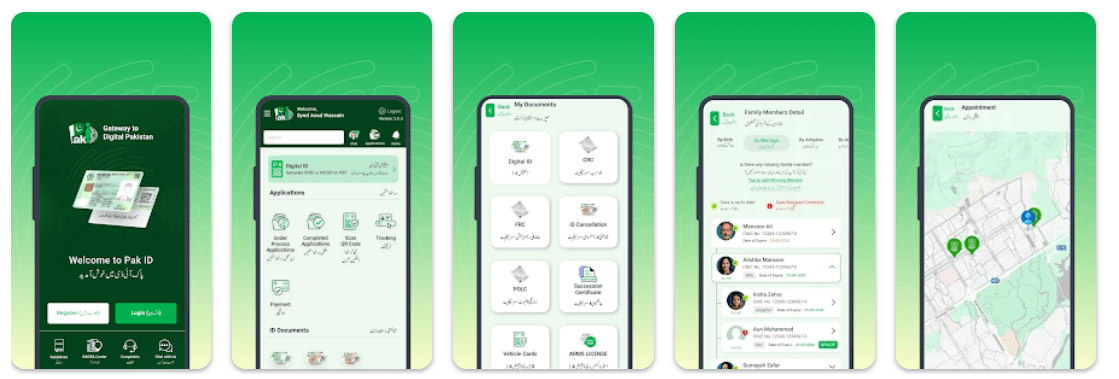
NADRA’s Pak ID application supports new NICOP applications, document uploads, identity verification, online payments and application tracking. Follow the instructions below to get started.
Step 1: Install the Official Pak ID App
Download the application published by NADRA using one of the official links below.
Always check the publisher before entering your personal information or uploading identity documents.
Step 2: Create an Account or Sign In
Open the app and create an account using the details requested. Existing users can sign in with their registered credentials.
Keep access to your email address and mobile number because the application may require verification during registration or login.
Step 3: Select New NICOP
After signing in, open the identity services and select New NICOP. Do not select renewal, modification or reprint if you are applying for your first card.
Step 4: Enter Your Personal Details
Complete the application form using information supported by your official records. Depending on the form, you may need to enter your name, date of birth, place of birth, nationality, address and contact details.
Check the spelling of your name and your date of birth carefully. Incorrect information or differences between your documents can lead to additional verification.
Step 5: Provide Your Family Details
Enter the required details of your parents or eligible blood relatives, including their CNIC or NICOP number where requested.
If the app cannot verify your family record, follow the instructions provided by NADRA. You may need to submit additional documents or use an applicable alternative verification procedure.
Step 6: Upload Your Documents
Upload the required birth or citizenship documents, passport or residence documents and any other supporting records requested by the app.
Make sure every document is clear, complete and readable. Do not crop out important details or upload a document that does not match the requested category.
Step 7: Complete Biometric Verification
Follow the biometric and identity verification instructions displayed in the app. Depending on your case, NADRA may require verification by a parent or blood relative, verification by an eligible identity card holder or another prescribed procedure.
NADRA states that biometric verification and photograph capture may require a visit to a Registration Centre. Therefore, do not assume every first-time application can be completed entirely online.
Step 8: Select Your Processing Category and Pay
Review the available Normal, Urgent or Executive processing options, where applicable. The fee depends on the applicant’s geographical zone.
Check the amount displayed in the official system and complete payment using an authorised payment method. Keep your payment confirmation for reference.
Step 9: Submit and Track Your Application
Review your information and documents before submitting the application. After submission, use the Pak ID app’s application tracking facility to check progress and respond to any requests from NADRA.
Your application may require further documents or verification before processing is completed.
NICOP Fee and Processing Time 2026
NADRA’s published fee structure lists the following charges and processing times for a new Smart NICOP. Fees are shown in US dollars by geographical zone.
Zone A: USA and Europe
Normal Processing
USD 39
Published processing time: 31 days
Urgent Processing
USD 57
Published processing time: 23 days
Executive Processing
USD 75
Published processing time: 9 days
Zone B: Middle East and Africa
Normal Processing
USD 20
Published processing time: 31 days
Urgent Processing
USD 30
Published processing time: 23 days
Executive Processing
USD 40
Published processing time: 9 days
Official fee source: NADRA Fee Structure.
Important: These amounts apply to Smart NICOP in the listed zones. Confirm your zone, the current fee and any applicable delivery charges through NADRA before paying. NADRA states that the processing timeline starts after fee payment; additional verification may affect the overall completion time.
What If Your Parents Are Unavailable for Biometric Verification?
NADRA provides specific alternatives for some applicants who cannot complete the usual family biometric verification.
Applicants Applying From Abroad
- NADRA lists verification of the application form by an eligible identity card holder as an option for applicants applying from abroad. Check the current instructions to confirm who can act as the verifier and what documentation is required.
Applicants Without a Blood Relative
- For certain system-independent cases, NADRA lists biometric verification by an eligible identity card holder along with Undertaking B. This alternative is subject to the applicable requirements and does not automatically apply to every applicant.
Applicants Applying Within Pakistan
- For eligible inland applications, NADRA lists prescribed attestation of the CNICF under the applicable regulations as an alternative to biometric verification by a parent or blood relative.
Check the official requirements before arranging attestation or submitting an undertaking.
Can You Apply at a NADRA Registration Centre?
Yes. If you cannot complete the online application or NADRA requires an in-person verification, you can visit a relevant Registration Centre.
Take your available identity, birth or citizenship documents, passport or residence records and family details. NADRA staff can review your documents and guide you through the required process.
Common NICOP Application Mistakes to Avoid
Check these points before submitting your application to reduce the risk of delays.
- Incorrect family details: Verify the CNIC or NICOP number before entering it.
- Name mismatch: Check that your name matches your supporting records.
- Unclear documents: Upload complete and readable copies.
- Wrong application type: Choose New NICOP for a first-time application.
- Incomplete verification: Follow all instructions provided by NADRA.
- Unofficial payment requests: Pay only through authorised channels.
Frequently Asked Questions
Can I apply for my first NICOP online?
- Yes. Eligible applicants can apply through NADRA’s official Pak ID app. Some cases may require further verification or a visit to a Registration Centre.
Can an applicant aged 18 or above apply for a first NICOP?
- Yes, provided the applicant meets NADRA’s citizenship and registration requirements and supplies the required documents.
How much is the first-time NICOP fee?
- The published Smart NICOP fee is USD 39, USD 57 or USD 75 for Zone A, and USD 20, USD 30 or USD 40 for Zone B, depending on the selected processing category. Confirm the current fee with NADRA before payment.
How long does NICOP processing take?
- NADRA’s published Smart NICOP timelines are 31 days for Normal, 23 days for Urgent and 9 days for Executive processing. The timeline starts after payment, and additional verification may affect completion.
Can I apply without a Pakistani passport?
- NADRA lists foreign passports, residence permits, travel documents and certain attested undertakings among the documents accepted for eligible applicants. Check the requirements for your particular case.
Can I apply if my parents are not available?
- Alternative verification procedures are available for certain cases. Check NADRA’s official instructions to determine which procedure applies to you.
Where can I check my NICOP application status?
- Use the application tracking facility in the official Pak ID app and follow any additional instructions issued by NADRA.
Final Words
Applying for your first NICOP through NADRA’s Pak ID app can make the process more convenient for eligible overseas Pakistanis. The key is to prepare the correct documents, enter accurate family details and complete every required verification step.
Before applying, check the official document requirements, current fee and processing category. If your parents or blood relatives are unavailable, confirm the applicable alternative verification procedure directly with NADRA.
Start here: Official NADRA New NICOP Application Guide.
Disclaimer: AllPrograms Pakistan is an independent informational website and is not affiliated with NADRA or any government department. We do not process NICOP applications. Always verify the latest requirements and fees through official NADRA channels.