MOFA Online Attestation 2026: How to Apply in Pakistan
 Follow us on Facebook
 Join our WhatsApp Channel
 Subscribe on YouTube
Getting your documents attested in Pakistan can take time, especially when you need educational certificates, marriage documents, legal papers, or business records for use abroad. Many people have to arrange the required verifications before their documents can be accepted by a foreign university, employer, embassy, or other organisation.
To make this process easier, the Ministry of Foreign Affairs (MOFA) has introduced an online document attestation system. The digital service became operational on October 12, 2026, allowing applicants to submit their requests online instead of visiting a government office in most cases.
Under this system, applicants can register through the official portal, upload their documents, complete the required verification and payment procedures, and receive an electronic attestation certificate through email after successful processing.
If you need MOFA attestation for your degree, personal documents, legal papers, or commercial records, this guide explains how the new system works, which documents may be eligible, what you need before applying, and how to submit your request online.
Quick Summary: MOFA Online Attestation 2026
- Department: Ministry of Foreign Affairs (MOFA), Pakistan
- Operational date: October 12, 2026
- Application method: Online through the official portal
- Services: General document attestation and apostille certification
- Basic requirements: Valid CNIC, active email address, and clear digital copies of the required documents
- Certificate delivery: Email after successful verification and completion of the required formalities
Important: Some documents may require additional verification or a physical visit to a MOFA office. Exact fees and processing times should be confirmed through the official portal.
What Is the MOFA Online Document Attestation System?
The MOFA online document attestation system is a digital facility introduced by the Ministry of Foreign Affairs to make document authentication easier for applicants in Pakistan.
Previously, applicants often had to visit an office to submit documents or complete attestation formalities. The new system allows eligible applicants to start the process online and follow their application through the digital platform.
According to the ministry’s announcement, the system became operational on October 12, 2026. A ministry circular issued on October 14, 2026, provided further information about the online service.
Through the portal, applicants can submit their information, upload the required documents, follow verification and payment instructions, and receive electronic attestation certificates by email after successful processing.
However, online submission does not mean that every document will be approved without further checks. MOFA may require additional verification or a physical visit when the nature of a document makes it necessary.
Which Services Are Available Through the MOFA Portal?
The digital system provides access to two main services. Before starting your application, it is important to understand which one you need.
1. General Document Attestation
General attestation is used to authenticate eligible documents under MOFA’s applicable procedures.
You may need this service when an organisation asks you to provide an attested educational certificate, personal document, legal paper, or commercial record.
Before selecting this option, check the requirements of the organisation requesting your documents. The required attestation procedure may depend on the document and the country where it will be used.
2. Apostille Certification
Apostille certification is a separate document authentication service intended for use in countries that accept the Hague Apostille Convention.
If you need to submit documents to a foreign university, employer, government authority, or another organisation, confirm whether it requires an apostille or general attestation.
Important Tip: Do not select an attestation service simply because it appears first on the portal. First confirm the requirements of the receiving authority and the country where your documents will be used.
Which Documents Can Be Attested Through MOFA?
MOFA’s attestation procedures cover different categories of documents. The following table lists examples of documents that may fall under these categories.
| Document Category | Examples |
|---|---|
| Educational Documents | University degrees, transcripts, matriculation certificates, intermediate certificates, and diplomas. |
| Personal Documents | Birth certificates, marriage certificates, death certificates, and family registration certificates. |
| Legal Documents | Powers of attorney, eligible affidavits, succession certificates, and guardianship documents. |
| Commercial Documents | Business agreements, incorporation certificates, company records, and commercial invoices. |
| Experience Certificates | Employment, teaching, medical, engineering, and other professional experience certificates. |
Please note: These examples do not guarantee that every document can be attested directly online. Acceptance depends on the document type, its issuing authority, the required prior verification, and the applicable MOFA rules.
Documents Required for MOFA Online Attestation
Before opening the application form, prepare your basic information and digital copies of the documents you want to attest. This will make it easier to complete the application without unnecessary delays.
Basic Requirements
- Valid CNIC: You need your Computerised National Identity Card number for registration.
- Active email address: Use an email address that you can access because the system may send application updates and the electronic certificate to your registered email.
- Clear digital copies: Prepare readable scans or digital copies of the documents requiring attestation.
- Supporting documents: Keep any additional identification, verification certificates, or supporting records required for your document category.
- Prior verification: Complete verification by the relevant issuing or authorised authority wherever required.
Do Educational Documents Need Prior Verification?
Yes, certain educational documents require verification before they can be processed for MOFA attestation.
- University degrees and transcripts: These generally require verification through the Higher Education Commission (HEC).
- Matriculation and intermediate certificates: These must follow the relevant verification process through the Inter Boards Coordination Commission (IBCC).
- Technical qualifications: Verification may be required from the relevant technical education board and the National Vocational and Technical Training Commission (NAVTTC).
- Commercial documents: Depending on the document, authentication from a Chamber of Commerce, the Trade Development Authority of Pakistan (TDAP), or another authorised body may be necessary.
The exact requirements depend on the type of document you are submitting. Check the applicable verification rules before uploading your application.
How to Apply for MOFA Online Document Attestation in Pakistan
You can begin your application through the official MOFA digital attestation portal. Follow the steps below carefully.
Step 1: Open the Official MOFA Attestation Portal
First, open the official website in your browser:
Official website: https://portal-attestation.mofa.gov.pk/
You can also open the MOFA portal login page directly.
Make sure you are using the official government portal rather than an unofficial website offering to submit the application on your behalf.
Step 2: Create Your Account
If you are using the system for the first time, select the registration option available on the portal.
The registration form includes basic information such as:
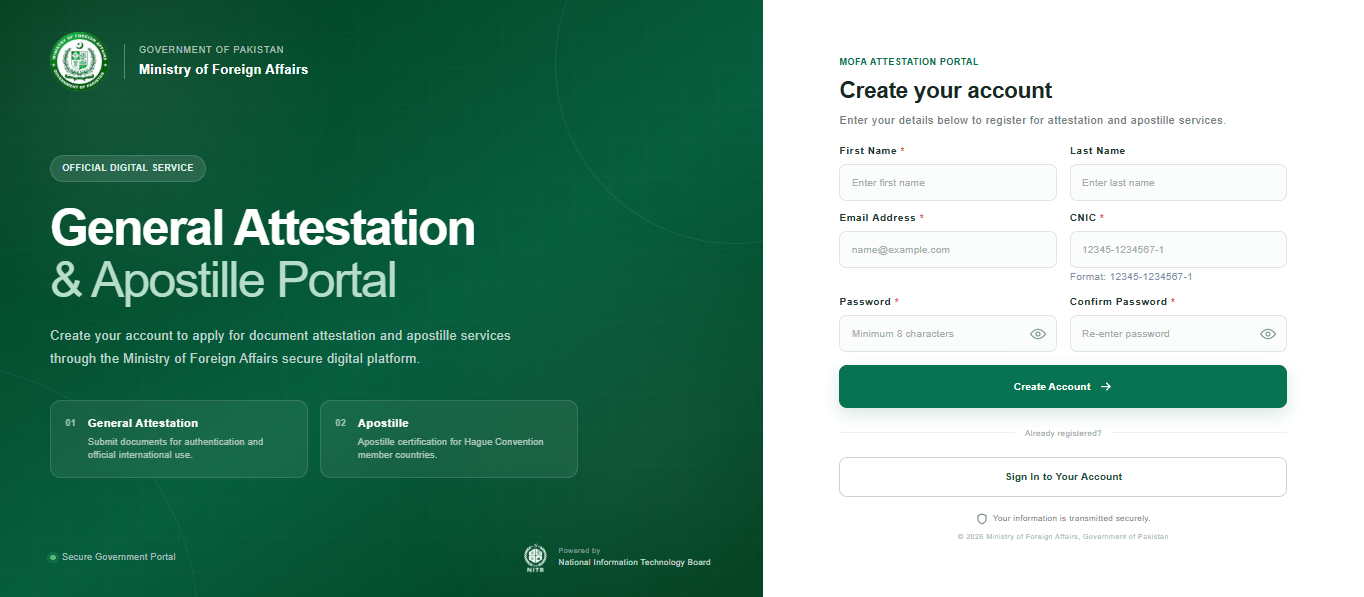
- First name: Enter your first name as required by the form.
- Last name: Enter your last name where applicable.
- Email address: Provide an active email address that you can access.
- CNIC number: Enter your CNIC number without dashes, as required by the registration form.
- Password: Create a password according to the portal’s requirements.
Review your information before submitting the registration form. An incorrect email address can create problems when you need to receive application updates or your certificate.
If you already have an account, use your registered email address and password to sign in instead of creating another account unnecessarily.
Step 3: Select the Required Attestation Service
After signing in, select the service that matches your document requirements.
- Choose general attestation when you require ordinary document authentication under MOFA’s applicable procedures.
- Choose apostille certification when your document requires an apostille for use in a country that accepts the Hague Apostille Convention.
If you are unsure which service you need, contact the organisation requesting your documents before continuing. Selecting the wrong service could result in additional work or delays.
Step 4: Enter Your Application Details
Complete the application form with the personal information and document details requested by the portal.
Read each field carefully and enter the information exactly as required. If the system asks for details relating to the document or its issuing authority, use the information shown on your original document and supporting records.
Important: The exact fields and available dropdown options may depend on the selected service and document category. The available information does not confirm every field displayed in the live portal, so follow the instructions shown on your screen rather than relying on an assumed form layout.
Step 5: Upload Your Documents
Upload clear digital copies of the documents required for your application.
Before uploading, check the following:
- The document is readable and all relevant information is visible.
- Your name and other details can be read clearly.
- You have included the supporting verification records required for your document category.
- The uploaded files meet the file type and size limits displayed by the portal.
- You have selected the correct document for each upload field.
Do not upload unrelated documents or submit unclear scans if you can prepare better copies. Incomplete or unreadable documents may require correction or additional verification.
Step 6: Review and Submit Your Application
Before clicking the final submission button, review the information you entered and the documents you uploaded.
Check your CNIC number, email address, document category, selected service, and supporting records. Correct any mistakes before submitting the application.
After submission, follow the status information and any further instructions displayed by the portal. Keep any application reference number or confirmation provided by the system for future use.
Step 7: Complete the Required Verification and Payment
Your application will be reviewed according to the relevant attestation requirements. Depending on the document, MOFA may require additional verification or further action before proceeding.
Complete the payment procedure according to the instructions provided through the official system.
The applicable fee depends on the selected service and document category. Confirm the amount displayed or communicated through the official portal before making payment.
Fee Warning: An exact fee schedule has not been established by the information available for this guide. Do not rely on unverified social media posts or pay an individual who promises guaranteed attestation. Follow the official payment instructions.
Step 8: Track Your Application and Check Your Email
After submitting your request, use the online system to monitor your application, where status tracking is available.
Check your registered email address regularly for application updates, requests for additional information, or further instructions.
If MOFA requires a correction or additional verification, follow the instructions provided through the official system.
Step 9: Receive Your Electronic Attestation Certificate
After successful verification and completion of the required formalities, MOFA will issue an electronic attestation certificate through your registered email address.
Once you receive the certificate:
- Open the email and download the certificate.
- Save a copy in a secure location for future reference.
- Check the certificate details for any apparent errors.
- Confirm that the receiving university, employer, embassy, or organisation accepts the electronic certificate in the format issued.
If the receiving organisation requires a particular format or additional formalities, confirm those requirements before submitting your certificate.
What If the Portal Requests a Physical Visit?
The online system is intended to reduce unnecessary visits, but some applications may still require physical verification.
If MOFA instructs you to visit an office, follow the instructions provided for your application. Do not assume that every document can be completed entirely online.
The ministry has identified its headquarters in Islamabad and liaison offices in Lahore, Karachi, Peshawar, Quetta, and Gujrat as locations where the service became operational. Confirm the applicable office procedure before travelling.
MOFA Online Attestation Fee in Pakistan
The exact fee for MOFA online document attestation should be confirmed through the official portal.
The amount may depend on whether you need general attestation or apostille certification and on the category of document being processed.
Before making a payment, check:
- The service you have selected.
- The document category covered by your application.
- The fee and payment instructions displayed through the official system.
- Any additional requirements communicated during processing.
Do not assume that every document has the same fee. No specific amount or complete fee schedule is confirmed in the information used for this article.
How Long Does MOFA Online Attestation Take?
The confirmed information available for this guide does not specify a standard processing time for every application.
The time required may depend on the document category, whether prior verification has been completed, and whether MOFA needs additional information or physical verification.
To avoid unnecessary delays, submit readable documents, enter accurate information, complete the required verification, and respond promptly to any instructions sent through the portal or your registered email address.
If you have an urgent deadline for a university admission, employment application, visa, or other official matter, confirm the expected processing time through the official MOFA channel before making plans.
You may also like: Pakistan E-Passport Fees 2026 – 5 & 10 Years, Normal & Urgent
MOFA Attestation Offices in Pakistan
The online facility became operational at MOFA’s headquarters in Islamabad and its liaison offices in the following cities:
- Islamabad
- Lahore
- Karachi
- Peshawar
- Quetta
- Gujrat
Even though the digital system is available, applicants whose documents require additional physical verification may still need to visit an office.
Before travelling, confirm the required documents, office procedure, and whether an appointment or another step is necessary. The information available for this guide does not establish a complete address list, office timings, or telephone directory for these locations.
Remember: AllPrograms Pakistan is an independent informational website. We are not affiliated with MOFA, do not process attestation applications, and cannot guarantee approval or faster processing. Submit your request and complete payments only through the official channels.
Frequently Asked Questions (FAQs)
1. When did MOFA’s online document attestation system start?
The system became operational on October 12, 2026, at MOFA’s headquarters in Islamabad and its liaison offices in Lahore, Karachi, Peshawar, Quetta, and Gujrat.
2. Where can I apply for MOFA online attestation?
You can access the official digital attestation portal at https://portal-attestation.mofa.gov.pk/.
3. Which documents can I submit for attestation?
The system covers different categories, including eligible educational, personal, legal, commercial, and experience documents. Acceptance depends on the document type and the applicable verification requirements.
4. Is a CNIC required for online registration?
The registration information provided for the portal includes a CNIC number, which must be entered without dashes. Applicants should follow the current registration form for all other requirements.
5. Do I need HEC verification before attesting a university degree?
University degrees and transcripts generally require verification through HEC before MOFA attestation. Check the requirements applicable to your particular document before submitting your application.
6. What is the difference between general attestation and apostille certification?
General attestation authenticates eligible documents under MOFA’s procedures. Apostille certification is intended for documents used in countries that accept the Hague Apostille Convention. Confirm the required service with the organisation receiving your documents.
7. What is the fee for MOFA online attestation?
The exact fee is not confirmed in the information available for this guide. Check the official portal for the applicable charges and payment instructions for your selected service and document category.
8. How many days does online attestation take?
A standard processing time has not been confirmed in the information used for this article. The time required may depend on document verification, the application category, and whether additional checks are necessary.
9. Will I receive my attestation certificate online?
After successful verification and completion of the required formalities, the electronic attestation certificate is sent to the applicant’s registered email address.
10. Do I still need to visit a MOFA office?
Many applications can be initiated online, but some documents may require additional physical verification. Follow the instructions provided for your application.
11. Can I use the electronic certificate abroad?
The certificate is issued electronically, but its acceptance depends on the requirements of the receiving authority and the applicable procedure. Confirm the required format and attestation type before submitting it.
12. What should I do if my application is delayed?
Check the application status through the portal, review your registered email for further instructions, and follow the official guidance provided for your application. If necessary, seek assistance through MOFA’s official channels.
Final Words
MOFA’s online document attestation system is an important step towards making document authentication more convenient for people in Pakistan. Applicants can begin the process online, submit the required information, follow verification and payment instructions, and receive an electronic attestation certificate after successful processing.
However, the online facility does not remove every verification requirement. Before applying, make sure your documents are eligible, complete any necessary verification from the relevant authority, and select the correct attestation service.
If you need document attestation for education, employment, business, or another official purpose, start by checking the requirements and visiting the official MOFA portal.
Ready to start? Visit the official MOFA Online Attestation Portal to review the available services and follow the instructions for your application.
Keep visiting AllPrograms Pakistan for practical guides and updates about government services, public programmes, and important developments in Pakistan.