How to Edit PSER Survey Online If You Made a Mistake? (2025)
 Follow us on Facebook
 Join our WhatsApp Channel
 Subscribe on YouTube
Imagine you filled out a very important government form, but then you realized that you made a small mistake. Maybe your CNIC number is wrong, or your mobile number has a typo. Now what? You panic. But don’t worry – if this happened in the PSER (Punjab Socio-Economic Registry) survey, we are here to guide you.
This guide will tell you everything. So please, read this till the end to avoid future problems and save your spot in government help programs like BISP, health cards, education stipends, and more Punjab Relief Programs.
What is PSER Survey?
PSER means Punjab Socio-Economic Registry. It is a big data collection survey done by the Punjab Government. Through this, the government learns about each family:
- How much you earn
- How many people live with you
- Do you need help?
- Are you poor or middle-class?
- Should you get free ration, loans, or scholarships and other government reliefs or not?
Why PSER Survey is So Important:
- Government uses this data for selecting families for BISP payments
- You may become eligible for loan schemes and Maryam Nawaz relief packages
- Your children may get stipends from school
- Poor families can get free medical treatment cards, free atta, and rashan bags
This one survey can decide a lot about your future benefits!
How to Edit PSER Survey Online?
Once you complete the PSER form and press submit, your data is locked.
Can I edit my PSER Survey online after submitting?
Answer: No. The official website https://pser.punjab.gov.pk/login clearly says that once submitted, changes are not allowed.
Common Mistakes That People Make:
- Wrong CNIC number
- Typo in mobile number
- Mistaken family member info
- Name spelling mistakes
- Wrong age or wrong head of family
Why No Editing Allowed in PSER Survey?
To protect the correctness of data. If people keep editing, the data will no longer be reliable. So, the website locks your submission.
But don’t be afraid. Even though you can’t fix it online, you can still fix it in person.
What to Do If You Made a Mistake in PSER Survey?
Step 1: Visit Nearest BISP/NSER Office
Every district and tehsil in Punjab has a BISP (Benazir Income Support Program) or NSER (National Socio-Economic Registry) office. This is your first stop.
Follow These Steps:
- Go to your nearest BISP/NSER Tehsil office
- Tell them: “I submitted my PSER form but made a mistake”
- Give your correct details and proof
- Request correction in data or re-submission form
Helpful Tip: You don’t need to visit Lahore for PSER help. Your local BISP or PSER tehsil office can solve your problem easily.
- Just click on the button below to go to the official PSER center finder page, type your division name, then your district, and finally your tehsil name. After that, click Search. You will see a full list of nearby registration offices.
PSER – Find Your Nearby Registration Center Here
Choose the nearest office to your home, take your documents, and visit them. The staff there will guide you step-by-step to fix your mistake.
How PSER Is Connected to BISP & NSER
Many people think PSER is a different thing. But it is directly connected to BISP and NSER. Let us explain:
| Term | What It Means |
|---|---|
| BISP | Benazir Income Support Program |
| NSER | National Socio-Economic Registry |
| PSER | Punjab version of socio-economic survey |
All your PSER form data goes into NSER, and BISP uses that to decide:
- Should you get monthly cash?
- Are you eligible for new Goverment relief packages?
- Can your child get stipend?
Mistake in PSER Means:
- You may miss cash payments from BISP
- You might not get free atta or rashan
- You may be declared ineligible for health cards or solar programs
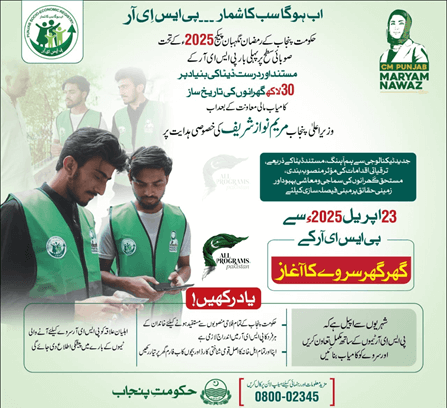
PSER New Ghar Ghar Survey Has Already Started from April 23
The Digital PSER Household Survey – Ghar Ghar Survey has already started from April 23 in Punjab. This is a new door-to-door survey where the PSER team comes to your house to collect or update family information. If they visit your home, you may get a second chance to correct your earlier mistakes or resubmit your PSER form with the right details.
But many people ask:
- What questions will they ask during the survey?
- What things should you not do when the team arrives?
- Can this Ghar Ghar survey update your old data?
To get full answers to all these important questions, you should read my detailed post about this new PSER Ghar Ghar Survey. It’s a must-read guide if you already submitted the form or missed the chance. Learn more here: PSER Ghar Ghar Survey Full Guide – Don’t Miss This
Final Words:
If you made a mistake in your PSER Survey form, don’t panic. You cannot edit it online, but you can still fix it easily by following the right steps.
Always Remember These Final Points:
-
You cannot change the PSER form online once submitted. The website does not allow editing.
-
Go to your nearest BISP/NSER Tehsil office – not necessarily Lahore. Your local office can help.
-
Take your original CNIC, a copy of it, any screenshot or printed proof of your submitted form, and any document that proves the mistake (like utility bill, school certificate, etc.).
-
If the mistake is about your child’s school info, like class or age, then visit your District Education Authority (DEA) office instead.
-
Be respectful and polite when you talk to the officers. Tell them clearly what the mistake was and why you need help. They are there to assist you, so speak with confidence.
This is your chance to make sure your information is correct in the PSER system. Wrong information can stop you from getting help in future programs like BISP, ration, or scholarships. Fix it now, don’t delay!